
If you run ads or spend any time staring at analytics, you already know the headache.
Every month, it feels like we’re losing more data. Browsers are aggressively blocking cookies. Users are installing ad blockers and Apple’s ongoing privacy updates have turned campaign attribution into a guessing game. You know people are buying, but your ad dashboards are taking zero credit.
This data blackout is exactly why every developer and tracking agency is suddenly obsessed with “Server-Side Tracking” in Google Tag Manager (GTM).
It sounds like intimidating developer jargon, but strip away the technical fluff and it’s simply a change in how we route the marketing data. Let’s skip the coding manual and talk about what this actually means for your campaigns, your budget and your sanity.
The Old Way vs. The New Way
To get why server-side is a big deal, look at how many advertisers have been doing things for the past decade and also from client-side tracking.
Normally, when a customer lands on your site, their browser loads all your tracking scripts. The Meta Pixel, the GA4 tag, the TikTok Pixel—they all fire directly from the user’s browser, scraping data and sending it to their respective platforms. It’s essentially a free-for-all.
Server-side tracking fundamentally changes this by acting like a bouncer at the door of your website.
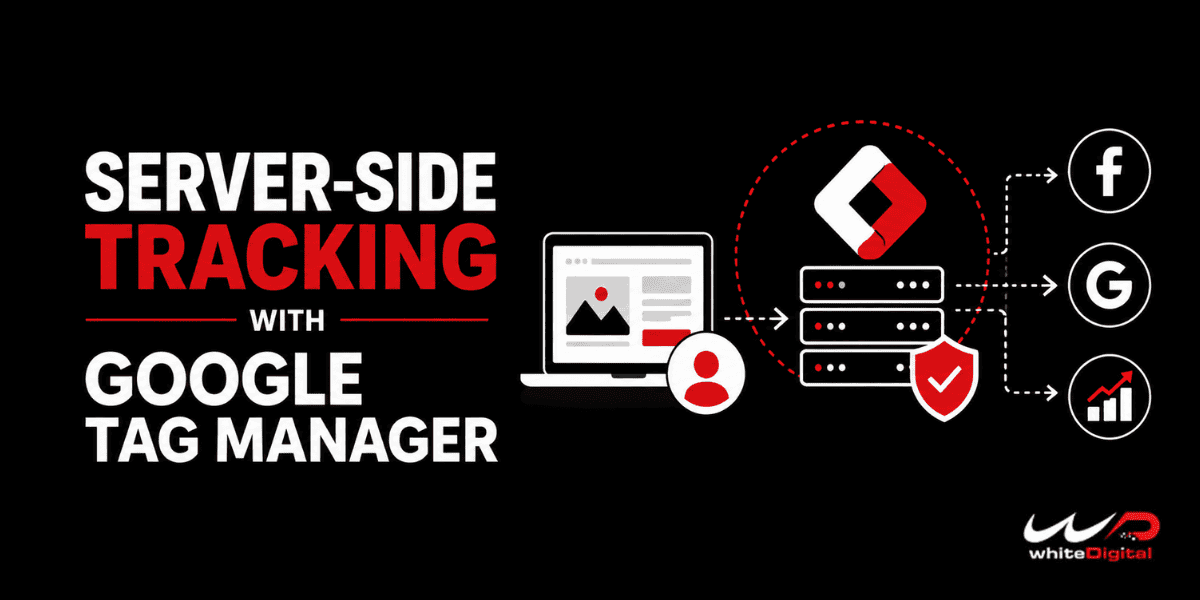
Instead of letting all these platforms extract data straight from the browser, your website sends the raw data to your own server first. You look at it, clean it up and then your server passes the necessary data along to Facebook, Google, or wherever else it needs to go.
The Old Way:
Website > User’s Browser > Ad Platforms
The Server-Side Way:
Website > User’s Browser > YOUR Server > Ad Platforms
Why Marketers Should Actually Care
This isn’t just about playing with shiny new tech. It solves three massive problems that are currently ruining your return on ad spend.
- You might Stop Losing Conversions to Ad Blockers
Ad blockers are trained to hunt down and kill third-party tracking scripts like the Facebook Pixel. But with a server-side setup, the tracking ping comes from your own domain.
Because it originates from your server, it is classified as first-party data. Ad blockers generally ignore first-party data, meaning you finally get to see those “missing” conversions in your dashboards again.
- You could Take Back Control of Your Data
Right now, third-party tags grab whatever they want from your users’ browsers. With a server in the middle, you get to play filter.
You can strip out sensitive customer information, such as emails or phone numbers, before you forward an event to an ad network. This gives you greater control over the data being shared and helps you manage your tracking setup with privacy requirements in mind.
- Your Client’s Website Speeds Up
Marketing teams love slapping new pixels on a website. But every script can add work for the user’s browser and potentially affect page performance.
By moving more of the tracking workload off the user’s browser and onto your server, you can reduce the amount of client-side processing required. A faster site equals a better user experience, which can contribute to higher conversion rates and better SEO performance.
Do You Actually Need to Do This?
Not everyone needs to rush out and build this today.
If your client runs a local B2B service, spends a few hundred dollars a month on Google Ads, or just uses basic analytics to see which blog posts get traffic, stick to your normal setup.
Server-side tracking requires renting cloud infrastructure, often through Google Cloud Platform and paying someone to set it up and maintain it.
Butif you run an e-commerce brand, spend thousands on paid social and your ROAS is tanking because platforms can’t track purchases accurately anymore, you are actively bleeding money by making decisions based on incomplete data.
In that scenario, server-side tracking can be a highly valuable investment.
How to Switch Without Breaking Everything
If you’re ready to make the jump, do not just flip a switch and move everything over on a Friday afternoon. That is a guaranteed recipe for disaster.
Here is the safe way to manage the transition:
Clean House First
Take a hard look at your current Tag Manager setup. If your tags are a disorganized mess now, migrating them will just give you a disorganized server.
Delete the old pixels and tags you don’t use anymore.
Move the Money Metrics First
Don’t migrate every single button click or page scroll right away.
Start with the events that directly impact revenue:
- Purchase
- Lead Submit
- Add to Cart
Focus on the events that actually influence your advertising and business decisions.
Run a Side-by-Side Test
Keep your old browser tracking running while you turn on the new server tracking.
Compare the two for a few weeks. Are the numbers matching up? Is the server catching more conversions?
Once you trust the server data, you can safely begin reducing your reliance on the old browser-side setup.
One Final Reality Check
There is a big misconception out there that server-side tracking is a cheat code to bypass privacy laws like GDPR or CCPA.
It is not.
Just because you are routing data through your own server doesn’t mean you can track people who explicitly opted out.
If a user clicks “Decline All” on your cookie banner, your server must respect that choice and handle their data according to the consent rules that apply to your implementation.
Server-side tracking isn’t a magic wand that fixes bad marketing. But in a landscape where data is getting harder to capture and harder to trust, it’s one of the most powerful tools available for improving measurement, data control and ad performance.
The goal isn’t simply to collect more data.
It’s to collect the right data, control how it moves and make better marketing decisions with it.