
If you are an advertiser running YouTube Ads, you already know that creating enough good video creative can become one of the biggest challenges in a campaign.
The challenge is not always a lack of ideas. Many clients already have images, videos, product photos, and social media content. The real challenge is turning those existing assets into creative that can work across different YouTube placements.
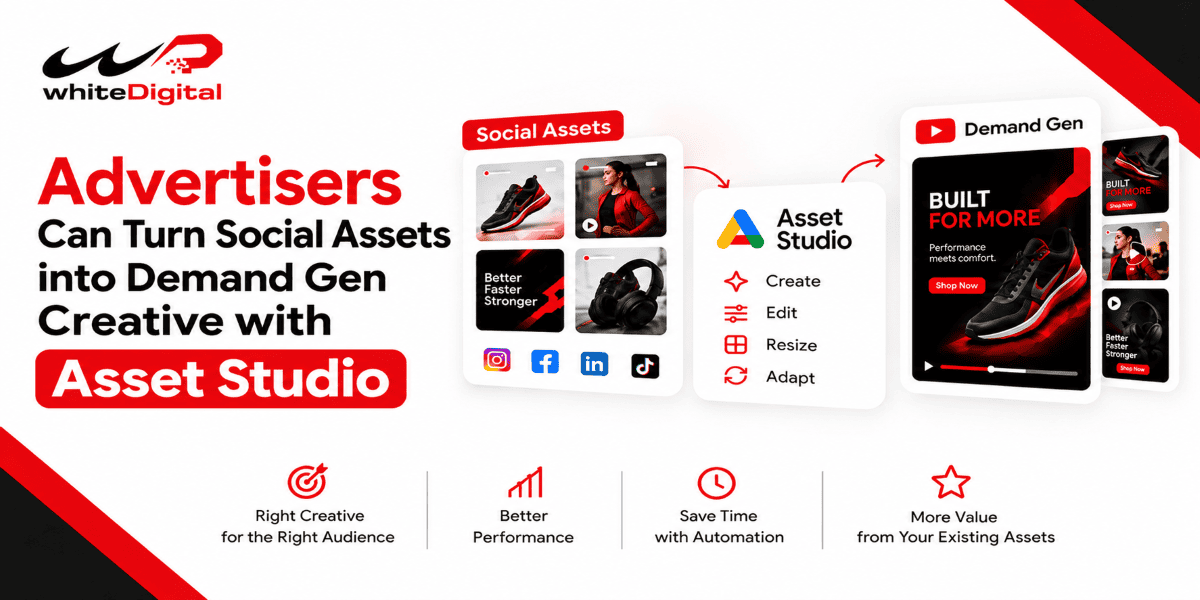
Google’s latest update is particularly focused on Demand Gen campaigns, where creative plays an important role across YouTube and other visual Google surfaces. Google is showing advertisers how they can start with existing social assets, use Asset Studio’s multimodal video creation to turn website URLs and photos into videos, and use performance data to guide their next creative tests.
I think this is useful because Demand Gen campaigns can use different video formats across YouTube, including YouTube Shorts, in-stream, Home, Search, and Watch Next. Instead of creating every video from scratch, you can make better use of the creative clients already have and adapt it for the right placements.
The focus is not simply on creating more videos. It is about starting with useful creative, making it suitable for Demand Gen placements and then using campaign data to decide what to improve or test next.
Google Asset Studio Helps Create Demand Gen Video Assets
One of the more interesting parts of Google’s update is Asset Studio’s multimodal video creation. Google says the tool, powered by Gemini Omni, can use website URLs and photos to create videos. Advertisers can preview the generated videos before publishing them.
If you want to try it, you can find Asset Studio inside the Tools menu in Google Ads. Under Create or edit your videos, look for Create a narrative-driven video and select Create Videos. From there, you can provide a creative source such as a landing page URL or Ad Group, and you can also add images or a description to guide the video creation process. You can then look at the brief, the storyboard, and the final video before putting it on YouTube.
When a business has good product images but doesn’t have much video content. Instead of waiting for a whole new video to be made, use the things they already have as a starting point and try using AI to make the video.
I would still think of the video as a version that needs a person to check it. I would make sure the branding is right, the product details are correct, the message is clear, the call to action is there, and the pictures look good. The overall quality is good before using it in a real campaign. AI can make things faster. I wouldn’t let AI make all the choices.
Start with Existing Creative for Demand Gen Campaigns
When I begin working on a YouTube campaign, I wouldn’t think the client needs all videos right away. I would first look at what the client has.
This could include Instagram or Facebook videos, product images, promotional graphics, website images, customer-focused content, or previous ad creatives. Google specifically recommends starting with existing creative, provided those assets meet Google’s specifications and guidelines. This can save an advertiser’s time and also gives us something useful to work from.
For example, if a client already has a short product video that performed well on social media, I can review that creative and consider whether it can be adapted for YouTube rather than starting the production process from zero.
The important part is not simply copying a social media post and uploading it. I would check whether the creative fits the YouTube placement, messaging, format, and campaign objective.
Use Existing Social Creative for Demand Gen
This is where the update becomes practical.
Imagine a client already has ten social media creatives. I would not automatically ask the client to create ten completely new YouTube videos. Then I could look at those items. Find which ones have the best chance of working.
For instance, if three social videos already show the product well, I could use those videos as a base for YouTube videos. I could then change the style to fit what is needed and make versions based on what the campaign wants to achieve.
The social media post doesn’t have to be linked to Google Ads. I would use the video and make sure it works for YouTube.
Where Demand Gen Creative Can Appear
I would also remember that this change is especially important for Demand Gen campaigns. Video ads can appear across different YouTube placements, including YouTube in-stream, YouTube Shorts, YouTube Home, YouTube Search, and Watch Next. Demand Gen can also extend beyond YouTube to surfaces such as Discover, Gmail, and the Google Display Network.
That means I would not create one video and assume it will look equally good everywhere. I would prepare the creative with the different placements and formats in mind.
This is where Google’s Ads Help documentation becomes particularly useful for advertisers. Demand Gen creative can appear across YouTube videos, YouTube Search results, Watch Next, the YouTube Home feed and YouTube Shorts, as well as other Google surfaces. That means I would not prepare one video size and assume it will work everywhere.
For video assets, Google supports:
- 16:9 horizontal video – recommended HD size of 1920 × 1080
- 1:1 square video – recommended HD size of 1080 × 1080
- 4:5 vertical video – recommended size of 1080 × 1350
- 9:16 vertical video – recommended size of 1080 × 1920, particularly useful for YouTube Shorts
Google’s guidelines specify a minimum video length of 5 seconds, while videos shorter than 10 seconds are not eligible to serve on YouTube in-stream. Google also recommends using videos longer than 15 seconds to help maximize reach and effectiveness across available formats. So, before I put a client’s video on YouTube, I would check the format, the size, and the length if it can be used where it needs to be.
Check the Safe Zones
I would also check the areas before using the video. Important words, logos, and other key details should be placed carefully so they are not hidden or cut off by YouTube’s design.
This is especially important when changing a video for a social media post into a vertical video for YouTube Shorts. Google’s video rules specifically say to check the zones.
Let Performance Data Guide the Next Demand Gen Creative Test
After the campaign starts, I would use the results to decide what new videos to try. I wouldn’t change many things at once or make a lot of similar videos without giving the campaign time to collect useful data.
Google says to change things and focus on the quality of new videos instead of just making more. For me this means looking at how the current video is doing, seeing what is working, and then using that to help make the next version
What This Means for Advertisers
From my point of view, Google’s update is not about giving advertisers a new AI tool. It is more about changing how we think about making videos for YouTube.
Clients already have a lot of content. The opportunity for advertisers is to make better use of those assets, adapt them for the right YouTube placements, use AI where it genuinely saves time, and then let campaign data guide the next round of testing.
I would not recommend creating dozens of AI-generated videos just because the technology makes it possible. I would rather create a smaller group of relevant, well-produced assets, test them properly, and use the results to decide what comes next.
Planning to offer Demand Gen and YouTube Ads to your clients? We can work with you as a White-label YouTube Ads Partner, supporting your agency with campaign setup, creative, and optimization while you stay in control of the client relationship. Contact us to discuss how we can support your next campaign.