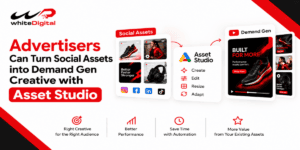


YouTube has come up with an update that can resolve the problem that has been bothering the video campaigns for the past years. Demand Gen is the newest version of video campaigns. This is not just another update but a way to boost your ad performance.
Using Demand Gen, now the advertisers can get inspiration tips, do research on tactics and make decisions about online purchases on Google and YouTube.
During the testing of working with Demand Gen, the advertisers who ran video ads with Demand Gen saw similar results to the actual video campaigns at the same cost. This could improve the performance of your ad campaign at the same cost but just by adopting to this multi-format strategy.
“Advertisers who uploaded video and image assets to Demand Gen saw 20% more conversions at the same cost per action than those who uploaded video assets only.”- Google.
How are Demand Gen different from Video Action Campaigns?
For advertisers, upgrading to Demand Gen has the same settings as in Video Action Campaign but with add-on benefits. These benefits also include optimization of performance with smart bidding.
Demand Gen Inventory

Image source: Google
This is a feature expanded from YouTube that also displays on Gmail, Discover and to Google Display Network, whereas the Video Action Campaigns are excluded from appearing on Discovery and Gmail.
For those who are new to this, the Discovery Feed is a feature that is compatible with mobile devices only. Readers use this to go through the feed based on what they like. If you are an Android user, just scroll from the left on the home screen and for those iPhone users, you can find it on the iOS Google app.
Google has also notified that they are expanding the channel controls to all available ad surfaces in Demand Gen, which will allow you to choose which ad to appear on the desired network.
Demand Gen ad format

Image source: Google
These are brought in to include images and they work with all sorts of ad formats that include instream videos, in-feed videos, shorts videos, in-feed images and shorts images.
What are the beneficial features of upgrading to Demand Gen?
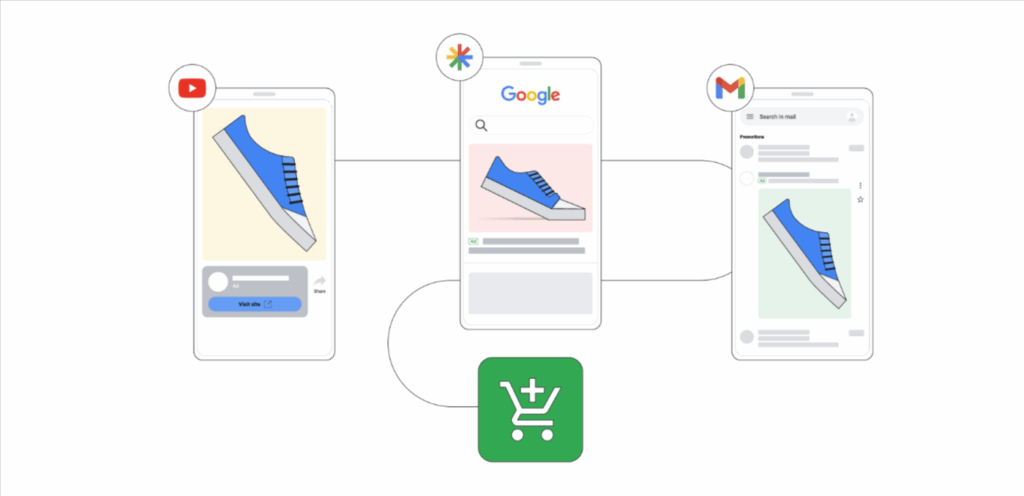
Image source: Google
Here are a few add-on features you gain from upgrading your ad campaign to Demand Gen.
1. YouTube ad Creatives
Creative preferences
This feature allows users to control which video or image appears on a particular placement. This can be anywhere between YouTube shorts, YouTube In-feed, and YouTube In-stream.
Creative A/B experiments
This feature allows users to test between two creatives and choose which works best. Whether it is a video or an image, the advertisers can choose which one performs best and can make use of it.
Let’s keep it simple with an example.
A man named Somu creates two ad variants, say creative x and creative y. With the Creative A/B experiment, Google will randomly split the audience into two groups with the same target budget and bidding. Both are equally treated and unbiased. Then Google runs the test and gives the result on which creative worked best and gave better clicks or conversions, or ROAS.
Now you might wonder which one to test with which one. Yep! And the answer is, you can test
- Short videos vs Long-form videos
- Unique creative message vs visual styles
- Single image vs carousel
Text prompt AI-generated images in Demand Gen
With the uprunning trend, everyone has their hands on generative AI images and videos. You can use it in Demand Gen, too.
There is no need to explain this, but we will look it into the shorter version. All you have to do is type in an appropriate text prompt and Google generates the image and you can use it in the Demand Gen campaign. This would save your time and money in producing an actual image for the YouTube ad.
2. YouTube ad Campaign setting
Lookalike segments setting
Lookalike segments are new customers fetched by Google based on interests, browsing habits, age, gender and much more. This information is fetched based on the seed list you provide.
Now, you might come up with a question: What is a seed list?
A seed list is nothing but the details of your existing customers. This list includes the regular website visitors, signed-up users, app users, YouTube subscribers or even viewers.
When the seed list is given, Google will work on it by categorizing and analysing according to behavioural patterns, Google search, purchase history, place, interest and much more.
Finding it confusing?? Let’s solve it with an example,
Let’s say you seed 2000 customers who have purchased from your client’s website. Google will help you find millions of customers with the seed you have provided.
With lookalike segments, you will earn more new potential customers who are like your client’s loyal customers.
Maximize click bid strategy setting
In Demand Gen, this is an automated feature. This lets you gain as many as clicks for the budget you have defined. Isn’t that cool!
This is suitable if you,
- Have not set up a conversion tracking
- Want to drive better traffic for a website or for a particular page.
- Want to test your ad creative
Let us look at it in a simpler version with an example
Let’s say Somu has not set up conversion tracking on Google Ads, but he wants customers for his website. So, if he chooses Maximize clicks in Demand Gen, it will automatically set the bid and help him get the maximum clicks out of the budget he has defined.
Still feeling confused about what strategy to use and when?
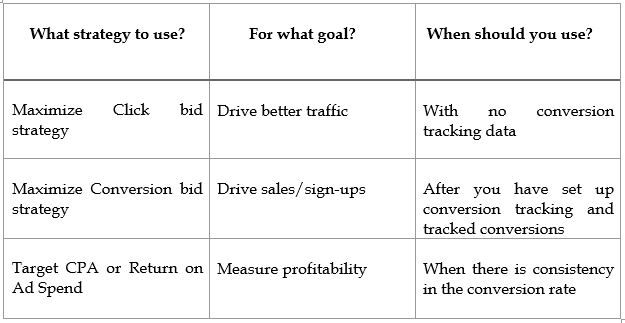
This is especially a great feature for those beginners who need time but don’t want to waste their ad spend.
Language and Location settings in Demand Gen at campaign and ad group level
With the new Demand Gen, you can set up location and language at the campaign level and ad group level.
But also know that if you choose the location and language and set the ad to live, you will not be able to change it.
With this feature, you can set up a single location or language for the entire campaign or set up different ones at the ad group level, but the budget will be one.
Previously, you would have been setting one location/ language for the entire campaign, but now with the new update, each ad group can have a different location. By this way, you will be able to identify which location and language perform well and invest more in it.
3. YouTube ad campaign Reporting
Format Segmentation Report
With the Format segmentation report, you will have a detailed and separate report on each ad format or ad placement.
This will help you fetch a detailed report rather than a mixed-up overall report. By this way, you will know which ad format paves the way in improving clicks, conversions, etc.
Why should you upgrade to Demand Gen?
- Demand Gen is based on placements and it helps run on multi-channels including YouTube, Discover feed, Gmail and much more.
- You get to work with better creative and ad formats. Demand Gen works on short-form videos, images, carousels, landscape images and formats. With this, you can easily capture the attention of the audience.
- Targeting and generating using AI, which is more effective comparingly.
- Creating awareness and driving action in one go.
- It paves the way for being a part in every step in the customer journey.
Now that you know the features and the benefits, let’s look into how to upgrade to Demand Gen.
How to upgrade to Demand Gen from Video Action Campaign?
For your YouTube ads to be more effective, it is important to upgrade to the new Demand Gen campaigns.
Manually transitioning your budget to Demand Gen
To manually move your budget from the Video Action campaign, make sure to do it with an adjustment. Do not suddenly move the complete budget to Demand Gen; Instead, slowly reduce the budget from Video Action Campaign and slowly increase it to Demand Gen.
Make sure to test it along while shifting. So that you will know whether it is working or not.
Copy and paste method
By this method, you can simply copy and paste from the existing Video Action Campaign setting, such as targeting, bid and creatives, to the Demand Gen.
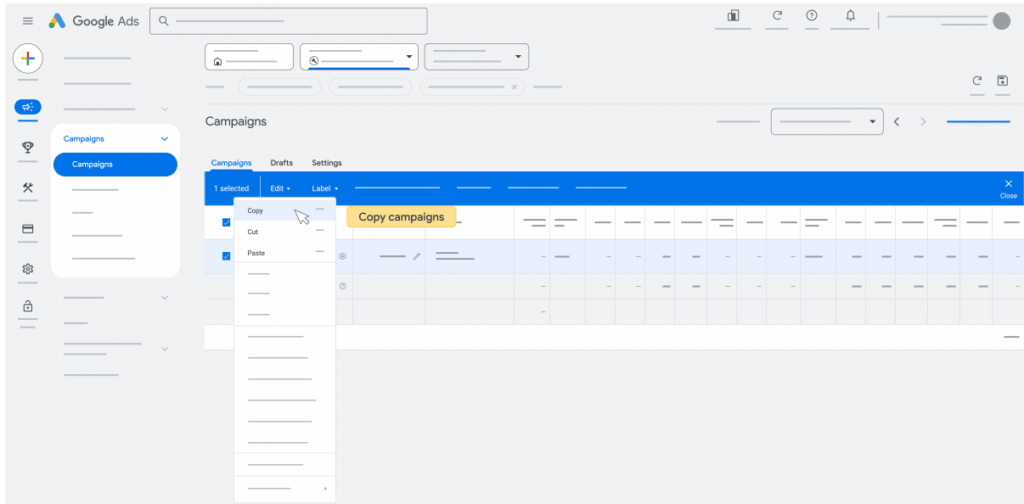
Image source: Google
When you copy and paste, you can bypass the procedures that are required at the start.
This is the best method if you already have a structured Video Action Campaign and just want to switch to Demand Gen.
Frequently Asked Questions (FAQ)
Q1. Will I be notified about the migration?
Yes, you will receive a notification in the Google Ad account.
Q2. Will there be a competition between Demand Gen and my existing campaign?
Google recognises if two campaigns are from the same advertiser. Google will not charge extra if your campaigns overlap.
Q3. Will I be able to view my history from my Video Action Campaign after shifting to Demand Gen?
If you copy and paste or automatically upgrade, the data will be available for viewing.
Q4. Should I need to get re-approved for creating a new Demand Gen campaign?
Yes, but this depends on the way you migrate and when you migrate your campaign.
Coming to an end, this is a great opportunity to upgrade your campaign and take your campaign to the next level. For those agencies who are finding it difficult to shift or have queries relating to this can feel free to contact us.