
When I review Google Ads reports, I always see that the focus is mainly on conversions. I count how many people bought a product, filled out a form called the business, or completed another action. However, have I ever paused to consider the people who saw an ad, visited a website, searched for the brand, and then returned days later before becoming customers?
Not every person who sees an advertisement is ready to purchase it. Some are simply discovering a business. Others are comparing options, checking prices, or seeking more information.
If I measure campaign performance by final conversions, I may overlook many important interactions. Google appears to be closing this measurement gap with the Customer Journey Insights reporting card inside Google Ads.
Conversion is not always the beginning of a customer’s journey in Google Ads
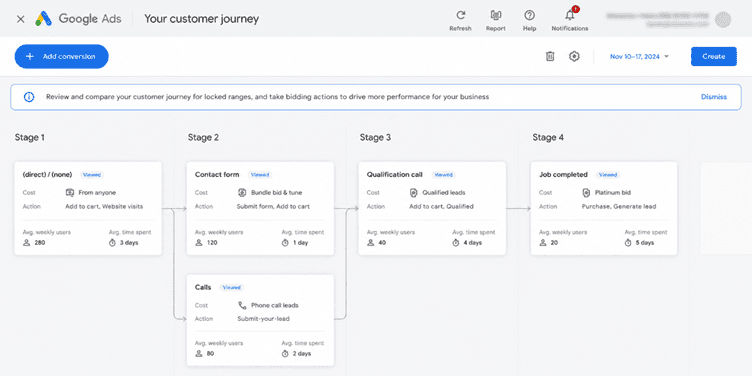
Let me give an example.
Imagine a person searching for a marketing agency. They discover a Google Search ad, visit the website, and then leave without submitting an enquiry. A day later, the same person searches for the agency’s brand name, visits the website, checks the services, and finally submits a contact form.
If I look at the final conversion report, I might see just one lead. In reality, there is a journey behind that lead. The first advertisement may have introduced the business to the customer. Later search and website interactions may have helped the customer make a decision.
This is where Google’s Customer Journey Insights becomes useful. Then, instead of focusing only on the final conversion, it offers eligible advertisers clearer visibility into how users move through the various stages of their customer journey.
Google Ads looks at four stages of the customer journey
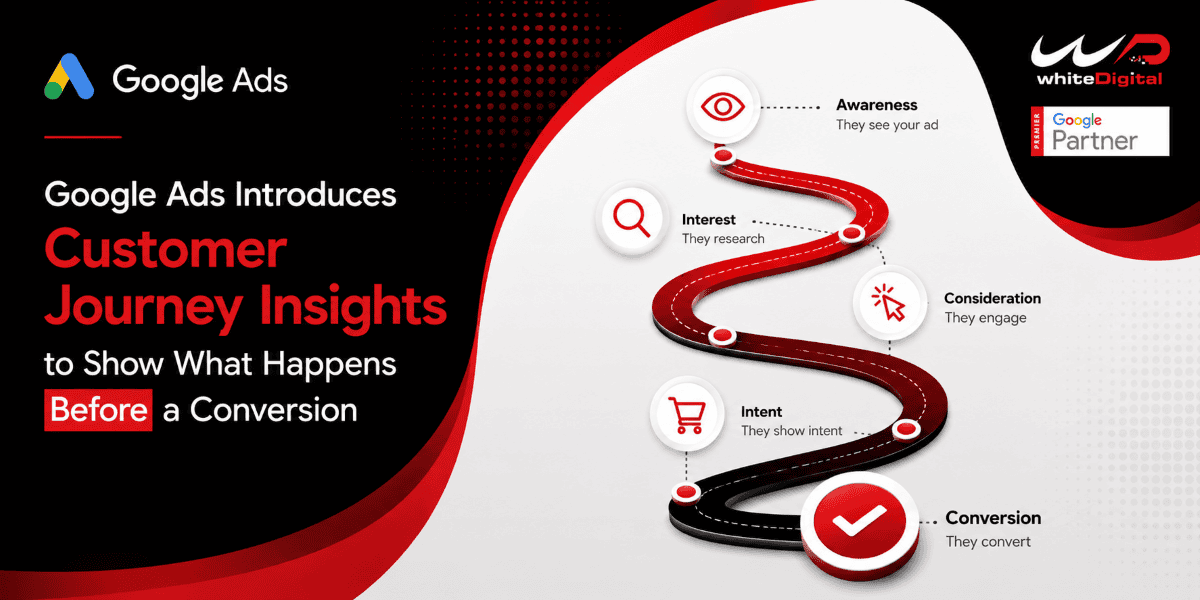
The new reporting card groups customer activity into four stages – Unaware, Aware, Act.
Here is my understanding of these stages from an advertiser’s perspective.
Unaware
At this stage, Google identifies users who have had no actions with the business in the previous 30 days. These users have not yet shown any of the qualifying interactions used for classification.
Aware
This is the stage where users begin showing signs of interest in a business. For example, they may click a search ad, engage with a YouTube ad, or search for the business brand.
Consider
At this stage, users show interest. They might search for the brand, visit the website, contact the business, request a quote, or take another qualifying action.
Act
This is the stage where users take conversion‑related actions, such as purchasing a product, adding an item to a cart, beginning checkout, or becoming a converted lead.
Google uses historical user journey data and observed actions to classify users into these stages. These classifications are model‑based, not manually selected.
What can Google Ads advertisers actually see?
Google Ads Customer Journey Insights card includes two tabs.
The first tab is the Customer Journey tab. It shows the number of users interacting with Google Ads campaigns before and after their ads run, along with their movement across the four journey stages.
The second tab is the User Actions tab. This provides the number of leading actions recorded within each stage. These can include branded searches, page views, contact actions, and add‑to‑cart activities.
For Google Ads advertisers, these two views offer perspectives. One helps understand how users move through the journey, while the other provides detail about the actions associated with that movement.
There is also an attribution detail to understand. If a user interacts with campaigns, Google Ads currently does not identify which individual campaign caused the reported stage movement. However, the same user is counted once across those campaigns.
Will every Google Ads advertiser see this option?
Not at the moment.
According to Google Ads documentation, Google Ads Customer Journey Insights is a pilot feature for advertisers. The campaigns must use Performance Max, Search, or Shopping. Eligible ads must run on Search, Shopping, Discover Feed, or YouTube within Performance Max.
If an account meets the requirements, the reporting card appears automatically on the Overview page. Google Ads advertisers can also add it to custom views. There is a reporting limitation worth keeping in mind.
Signed‑in users only – The current reporting covers users who are signed in.
Reporting delay – Data can have an eight‑day delay because of processing requirements.
Reporting – This card can hold data from up to 180 days back, and it also starts with a 60‑day backfill when you first use it.
No manual setup required – Advertisers do not have to change any settings or do anything to use this card.
These limits matter because the numbers might not show every person who saw or clicked your ads.
Why I think this reporting change matters in Google Ads
I find the interesting part of this update is that it asks advertisers to look past the last click and final conversion.
Think of a campaign that shows a business to people who have never heard of it. It may not get quick questions, but those people might later search for the brand, visit the website, and then finally convert.
If an advertiser does not see those steps, they might think the campaign is not helping the business grow. Customer Journey Insights gives advertisers another way to look at those earlier steps and see how much long‑term value the campaign really has.
Customer Journey Insights does not replace conversion tracking. Decide exactly which campaign should get more money. Instead, it adds another layer of reporting that helps explain what happens before a conversion.
For anyone who runs Google Ads campaigns, I think this is a development worth watching. Often the true value of an ad is not obvious in the click or the first conversion report. Seeing the whole journey before that conversion gives a clearer picture of how the campaign performs.
Want to understand how Google Ads Customer Journey Insights can improve your campaign performance? Contact the WhiteDigital team for Google Ads support, campaign audits, and optimization strategies.