

Google will enforce product image size for Shopping ads from 2027. Google is going to enforce product image size for Shopping ads starting in 2027.
Google is updating its product image size requirements in Merchant Center. Effective January 31st, 2027, all images provided with product attributes image_link and additional_image_link must be at least 500 × 500 for all product categories and marketing methods. The updates will impact all Google Shopping advertisers, since product images must be uploaded through Merchant Center.
This update will be mainly focused on the image size but also on the quality of the images. Product images should be clear, represent the product accurately and free of any distracting elements. It is recommended that merchants check product images prior to the new rule’s implementation.
What Is Changing for Google Shopping Ads?
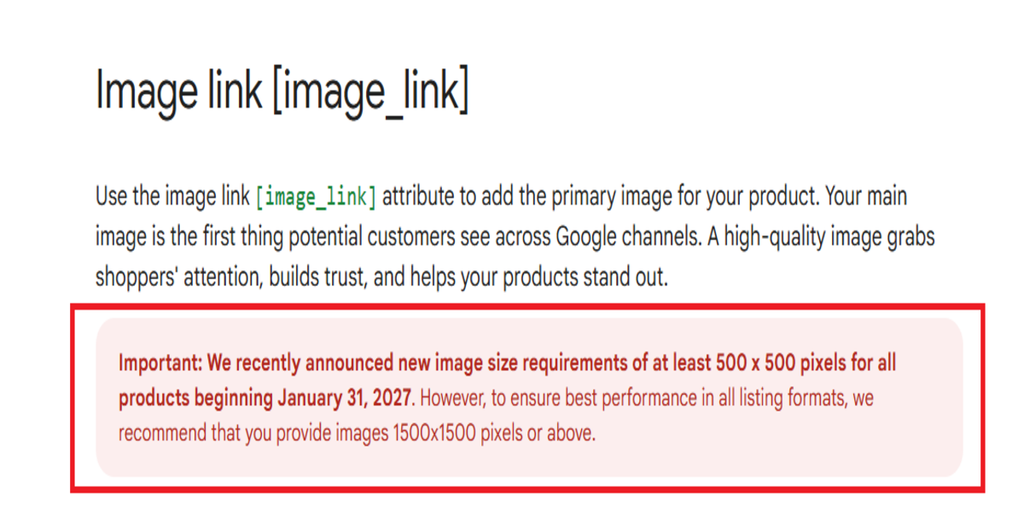
The new requirement is for the main product image and for any other product images that are submitted via the Merchant Center. Google will start warning on April 14, 2026, if images fail to meet the new minimum resolution. The enforcement will start January 31, 2027.
Sign into Google Merchant Center and click on Products. You can locate affected products by logging in to Google Merchant Center and clicking Products. Click Needs attention and look at this product’s history for the warning: Image too small for upcoming enforcement.
The solution to this is to replace the lower-resolution pictures with higher-resolution pictures. Ensure that you include the image_link attribute in your product feed for the main image and additional_image_link to additional images. You will need to enter all the product information again and check whether the warning has gone away in Merchant Center.
Google also suggests employing photos that are at least 1,500 × 1,500 pixels if feasible. to aid quality in various listing formats.
Image Size vs. Image Quality in Google Shopping Ads
Image size is the width and height of an image in terms of the number of pixels. For instance, an image of 300 x 300 does not satisfy the requirement, as it may not be large enough to handle.
The image quality is the clarity of the product. An image may have the minimum dimensions required, but lack sharpness, may be pixelated, or may fail to be readable at the given size.
Google Merchant Center has separate guidance for these issues. The upcoming 500 × 500-pixel rule is about image size, and the “Low image quality” issue is related to any image quality issues, including blurriness, pixelation, and low resolution.
Resolve “Low Image Quality” problem
If Merchant Center says image quality is low, take the necessary actions according to Google’s guidelines:
- Open Google Merchant Center and select your merchant account.
- Go to Products then look for Needs attention warning
- To find products with the issue “Low image quality [image_link]” use the image filter
- Choose the product that is affected and click Edit product.
- Replace the image with a better image.
- Save and go to the Needs Attention page and see if the problem was solved
If there are multiple products, download the CSV list that’s found in the Needs attention section. Review product data against the product and then edit the appropriate image links and upload the corrected product data as normal. It can take time for changes to be reflected in Merchant Center.
What Should Advertisers Do Before January 31, 2027?
Advertisers should check their product feeds well before the enforcement date. Check the image warnings in Merchant Center, replace images below the new minimum, and verify that new image URLs appear in the submitted product data.
Image clarity and accuracy should also be considered by the merchants. Google does not want to see images that don’t depict the product, promotional text or watermarks, and thumbnails that are low resolution. The product ought to be clearly discernible in the image.
Final Thoughts
Google’s new requirement for Merchant Center images will be enforced on January 31st, 2027. Google’s enforcement will impact businesses selling products online: businesses are advised to review their product image size, to review for any affected products, look for low-quality image warnings, and rectify the issue before enforcement takes effect.
By using images that comply with Google’s guidelines, merchants can reduce the likelihood of any product issues related to images and give consumers a more robust product image.
Need help with your Google Shopping Ads campaigns? Contact WhiteDigital for support with Google Ads management, campaign audits, and performance optimization.