

Google made a User Groups Admin API update for GA4 on October 5, 2026, which gives teams a way to control user groups and their membership. This update is important for marketing agencies and analytics teams that handle access across many accounts and properties.
Instead of handling every group by hand, teams can use the API to create, change, and delete user groups and manage group membership with code. This can make managing access easier to keep up with as teams get bigger or as client tasks change.
What Is the Google Analytics User Groups Admin API?
The User Groups Admin API lets companies handle user groups and their access settings using code. According to Googles news user groups make it simpler to manage access for teams.
For agencies that work with analytics for clients this kind of automation can help cut down on repeated administrative tasks and make group membership easier to keep up with.
Google’s October 5 news talks about two features.
1. Create and Manage User Groups
The API lets teams create user groups, change details of existing groups, and delete groups using unique identifiers.
For example, an agency could put team members into groups based on their work, like analytics reporting, campaign management, or account administration. When team duties change, admins can change the groups using code.
This can help companies keep the group structures across their analytics work.
2. Control Group Membership and Roles
The update also lets users add people to groups, remove people from groups, and set membership permissions as either a member or an owner.
This gives admins a way to handle group membership through API calls of just doing it manually.
For example, when a new person joins an agency, an admin can add them to the group. When someone leaves a project, their group membership can be updated to show that.
Keeping group membership up to date is important for managing access as teams and client accounts change.
Access Required for the Google Analytics User Groups Admin
Google says that using these API features needs User Admin or Org Admin access on the organization.
These access levels are important because the API changes user group settings and membership. Before starting an automated process, companies should check that the account making the API requests has the administrative access.
Teams should also look at their access management methods to make sure that group membership and access match each person’s job.
How to Set Up User Groups in Google Analytics
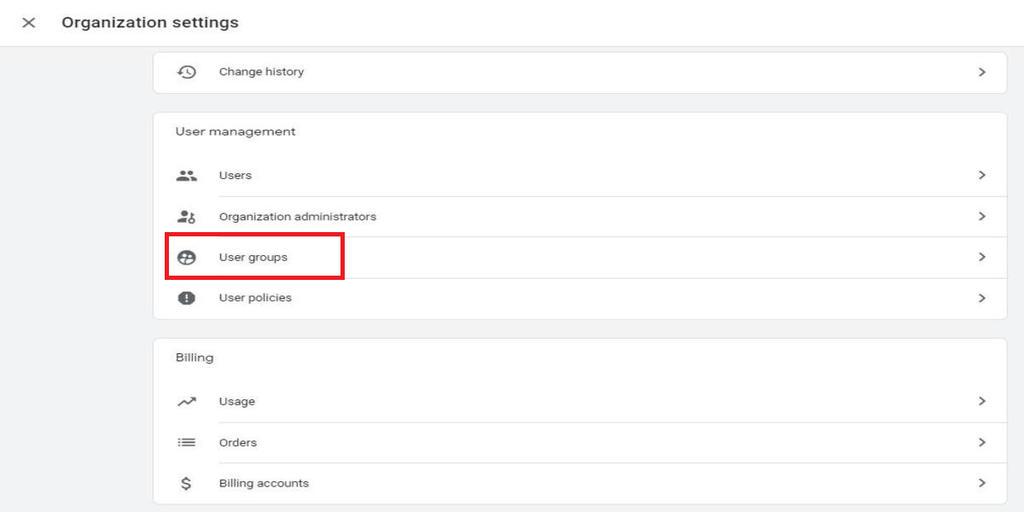
You can create user groups through Google Analytics access management if your Analytics account is part of an organization and you have Administrator access. If you want to manage groups, you can use the Google Marketing Platform Admin API.
Step 1. Open GA4 Admin
Log in to Google Analytics, choose your account and property. Click Admin in the bottom left.
Step 2. Open Access Management
Under the Account or Property section, click Account access management or Property access management depending on where you want to handle permissions.
Step 3. Create a User Group
Click the + button. Choose Add user groups. Then select Add group, type a group name and description and create the group.
For example, an agency could make groups called Google Ads Team or Analytics Team.
Step 4. Add Team Members
Open the group details, go to Members, and add the email addresses of the people who need access. You can also add existing groups if your organization uses a group-based system.
Step 5. Assign Permissions
Choose the permissions for the relevant Analytics account or property. Check the access level carefully so that team members get the permissions they need for their work.
Step 6. Automate Group Management Through the API
To manage groups, look at Google’s User Groups API Guide.
Developers can use the API to create, change, list, or delete groups. The membership API allows adding and removing members. This needs API authentication, the OAuth scope, and the needed administrative access.
For example, an agency could automatically add a worker to the right user group when they join a project instead of doing every membership change by hand.
What This Means for Analytics Teams
The update gives a way to manage user groups using code, which might be very helpful for agencies and companies with teams.
Possible benefits include:
- Less manual administration: Automate group creation and membership updates rather than doing each change by hand.
- Simplify team management: Assign users to groups by role and task.
- Easier onboarding and offboarding: Change group membership for people joining, leaving or moving projects.
- More consistent access workflows: Use code to keep group settings consistent for day-to-day administration tasks
The real benefits will depend on how an organization makes its groups and adds the API to its ways.
Final Thoughts
The Google Analytics User Groups Admin API update gives teams a way to handle user groups and their membership using code. For agencies and businesses that manage access, for people, it can help cut down on repeated work and support better access control.
Before using the API, teams should read the guides, check their admin access, and see how automated group management fits into their current access control methods.
Need help with Google Analytics setup, tracking, or access management? Contact our WhiteDigital team to discuss your requirements.