

While creating Google Ads, one of the things that I keep an eye on is the keywords that trigger the ads to show.
At times, I find my ads being triggered by people who do not have an interest in the products/services that I am providing. These clicks can use up the advertising budget without bringing the right leads or sales.
That is where negative keywords become useful.
Negative keywords tell Google which searches we do not want our ads to show for. For example, when creating a Google Ads Campaign for a florist, I want my ad to be clicked by people searching for “buy flowers online” or “florist near me”. But I don’t want people searching for “artificial flowers” or “free flower arrangement courses” to see the ads.
In this case, I can add “artificial,” “free,” and “course” as negative keywords according to the products or services we are selling and our target audience.
Negative keywords mainly help eliminate irrelevant traffic so the ad budget is used effectively.
Where I Add Negative Keywords in Google Ads
I can place negative keywords at the account level, campaign level, and at ad group level. The decision on which level to place the keywords depends on where I want to exclude those searches.
For example, if I don’t want my ads to be shown for any florist jobs across my account, I can place these job-related keywords at the account level. In case I want to prevent searches for birthday flowers only in one particular campaign, then these terms can be placed at campaign level. If I want to keep searches for different types of flower arrangements separate, I can use ad group-level.
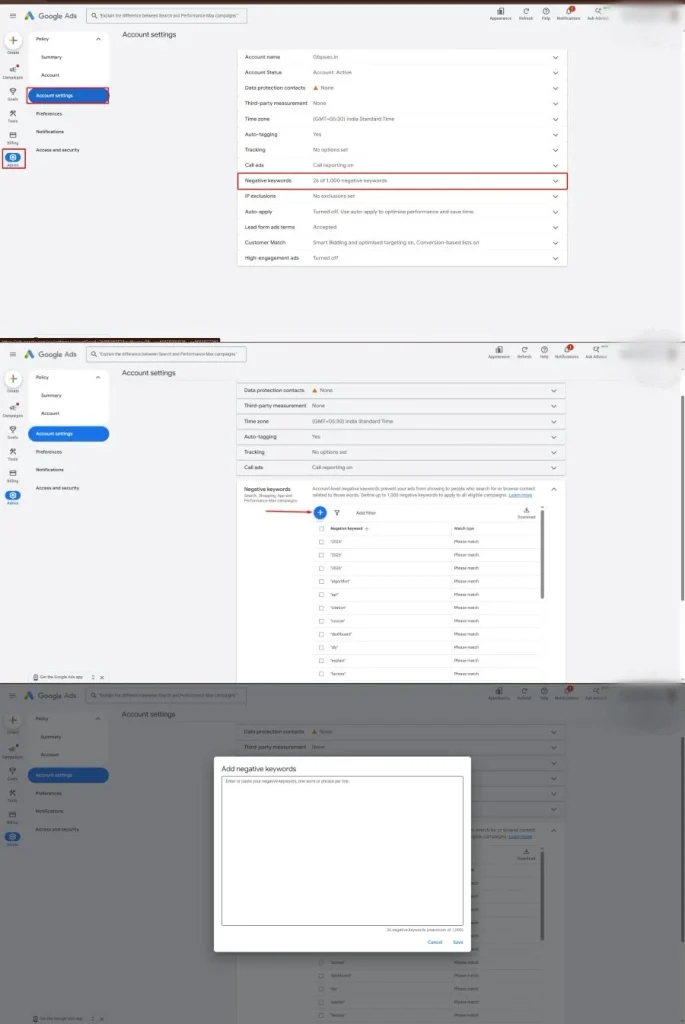
Account-Level Negative Keywords
Account-level negative keywords are helpful when I want to exclude some searches across campaigns in my Google Ads account. Instead of applying the same negative keywords individually in different campaigns, I would include them only once at the account level.
For instance, let’s assume that I am running Google Ads campaigns for a florist. The account consists of different campaigns for flower delivery, wedding flowers, and birthday bouquets.
If the florist does not provide job positions or flower arranging training classes, it could be necessary to block such searches in all campaigns.
In this case, account-level negative keywords can make things easier.
But not all negative keywords should be included at the account level. First of all, I would check whether the search term is irrelevant to all campaigns or not. The search term that is irrelevant for one campaign could be relevant for another.
Campaign-Level Negative Keywords
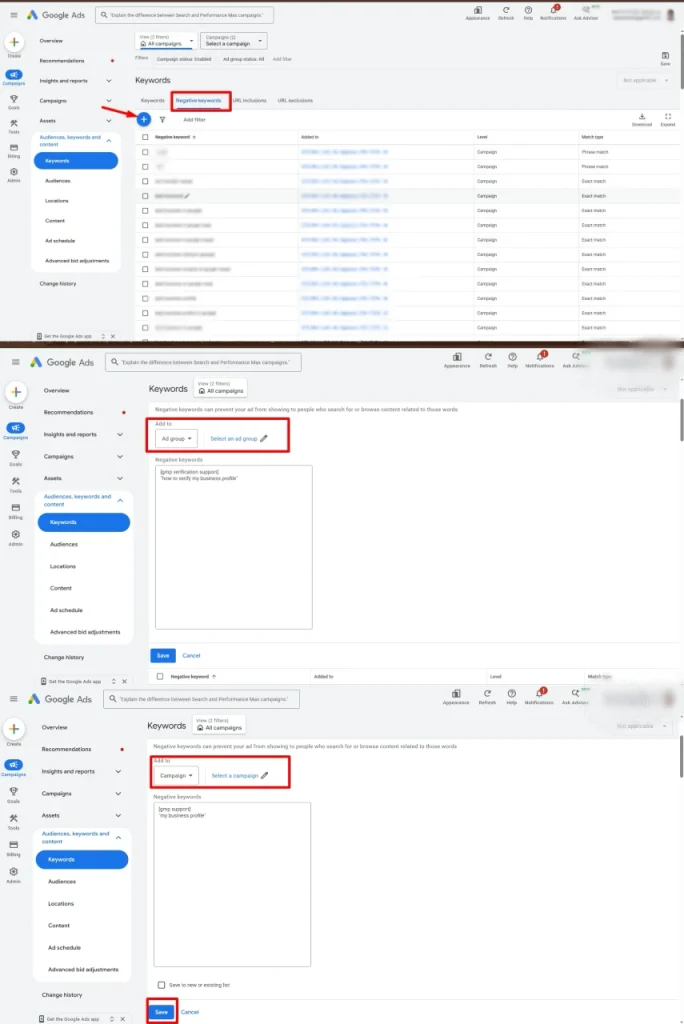
Negative keywords on a campaign level would be useful if I wanted to prevent specific keywords from triggering ad appearances in one of the campaigns, but not for the entire account.
For instance, let’s consider that I manage two campaigns for a florist. In one campaign, I advertise wedding bouquets, while in another, it is the birthday bouquets that are being promoted.
Then, in my first campaign, I would use a negative keyword “birthday”, since I would like to target users who search for wedding bouquets, bridal flowers, and wedding decorations, but not those who are seeking to buy flowers for a birthday.
But the second campaign must be able to appear when users are searching for birthday flowers. Using an account-level negative keyword “birthday” will affect every campaign, including the campaign that I am running for birthday bouquets too.
Ad group-Level Negative Keywords
Ad group-level negative keywords can be useful when I need to control which searches trigger my ads in particular ad groups. Negative keywords can be useful in situations where different ad groups correspond to different flowers or flower arrangements within one campaign.
Suppose, for example, that I launch a Search campaign, which has two ad groups, namely the rose bouquets ad group and lily bouquets ad group.
The rose bouquets ad group has keywords “buying rose”, “red rose bouquets”, and “rose delivery”. The lily bouquets ad group has keywords “buying lily”, “lily arrangements”, and “lily delivery”.
In order to make the searches as relevant as possible, I might consider adding the negative keyword “lily” to the rose bouquets ad group and the “rose” keyword to the lily bouquets ad group.
This prevents each ad group from competing for searches meant for the other flower, so ads for one flower don’t show to someone looking for another.
I will choose ad group-level negative keywords if an exclusion is only relevant to one ad group and not to the whole campaign.
Understanding Broad Match, Phrase Match, and Exact Match Negative Keywords
Choosing the right negative keyword match type is just as important as choosing the right keyword. It determines which searches Google will exclude.
One thing I keep in mind is that negative keyword match types work differently from regular positive keyword match types. We should not assume that a negative keyword will automatically block every similar word or variation.
Broad Match Negative Keywords
Broad match is the default match type in negative keywords. It ensures that an ad doesn’t appear on searches having all the words of the negative keyword, regardless of their position.
Let’s say I am managing Google Ads for a florist business that sells only fresh flowers, not artificial flowers. In this case, I will choose the broad match negative keyword as
Artificial flowers
It means my ads will not show for searches like “artificial flowers for wedding”, and “flowers artificial”, since these have the words of the negative keywords.
However, my ads will still be shown for “artificial flower” searches, because here we have the singular form of the words instead of the plural one.
I choose broad match negative keywords when I do not want my ad to show up for searches that include all the words of the term, irrespective of their positions.
I would still check the search terms before adding a negative keyword to make sure I am not blocking relevant searches.
Phrase Match Negative Keywords
Phrase match negative keywords ensure that the ad does not get displayed if a search has the mentioned words in the exact sequence. The search can contain additional words before or after the phrase.
Let us consider an example. If I use this negative keyword:
“artificial flowers”
Then my ad will not appear on searches such as “cheap artificial flowers” and “artificial flowers for weddings,” since both of them have the words “artificial flowers” appearing in the exact sequence.
However, my ad could still get displayed on “flowers that are artificial,” as these words do not occur in the exact sequence.
Exact Match Negative Keywords
Exact match negative keywords are more limited. These stop my ads from appearing when the search term uses the same keyword words in the same order.
Let’s say I add:
[artificial flowers]
The ads would not appear for the search term “artificial flowers”.
But it could still appear for “cheap artificial flowers” or “artificial flowers for weddings” since there are other words in the search terms as well.
I would use exact match negative keywords when I want to block a specific search but not others that have the same words.
How I Find Negative Keywords for My Google Ads
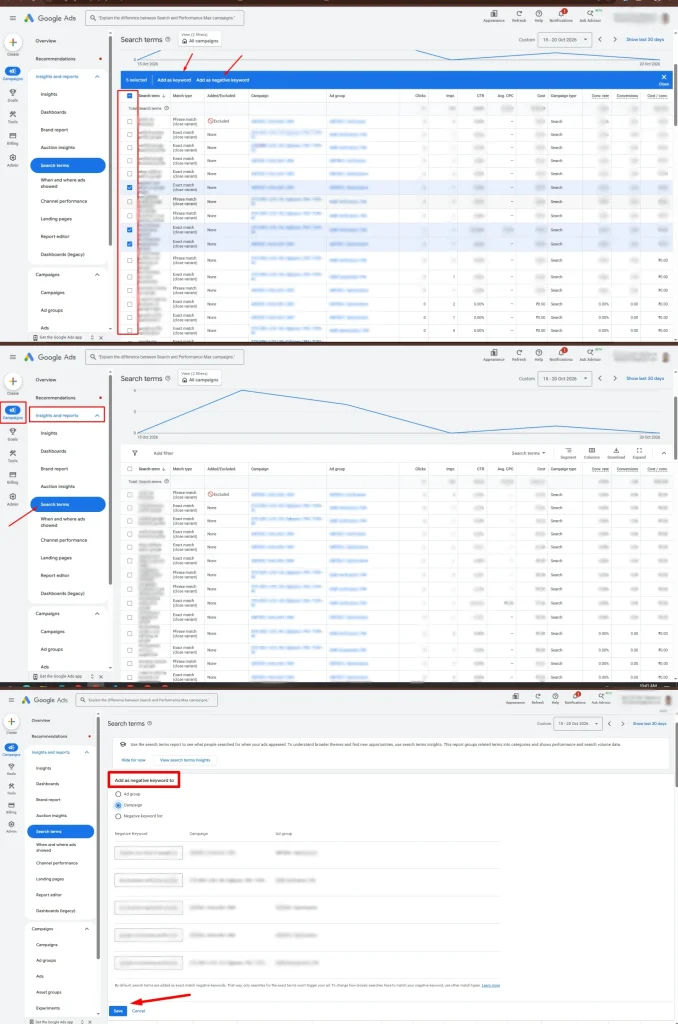
I don’t think that negative keywords can be used only during campaign setup since search can change over time and new irrelevant searches may appear even when the original keyword list looks good.
This is the reason why I analyze the Search terms report within Google Ads. It displays the searches performed by people who have triggered my ads.
During the analysis, I try to find out the searches irrelevant to our services/product we provide. I look at those search terms that result in clicks and spend but do not seem to produce any results.
So, if I am running ads for the florist that offers fresh flower bouquets, I might discover searches like “artificial flower bouquets” or “florist jobs” or “free courses on flower arranging”.
At the same time, I do not automatically exclude every search that has not generated a conversion. I review the search term, the campaign objective, and the available performance data before deciding whether to exclude it.
My Final Thought
For me, negative keywords are important when it comes to managing Google Ads. The negative keywords allow us to select the search terms on which ads will not be triggered and make better use of the advertising budget.
At the same time, I think selecting the correct levels and match types is an important aspect of this process. In particular, account-level negative keywords will be helpful when creating exclusions to all campaigns. When an exclusion is valid only for one campaign, campaign-level keywords should be selected, whereas ad group-level negative keywords help me exclude searches that are irrelevant to specific ad groups.
The key point is that I use the Search terms report on a regular basis instead of relying only on my negative keyword lists.