
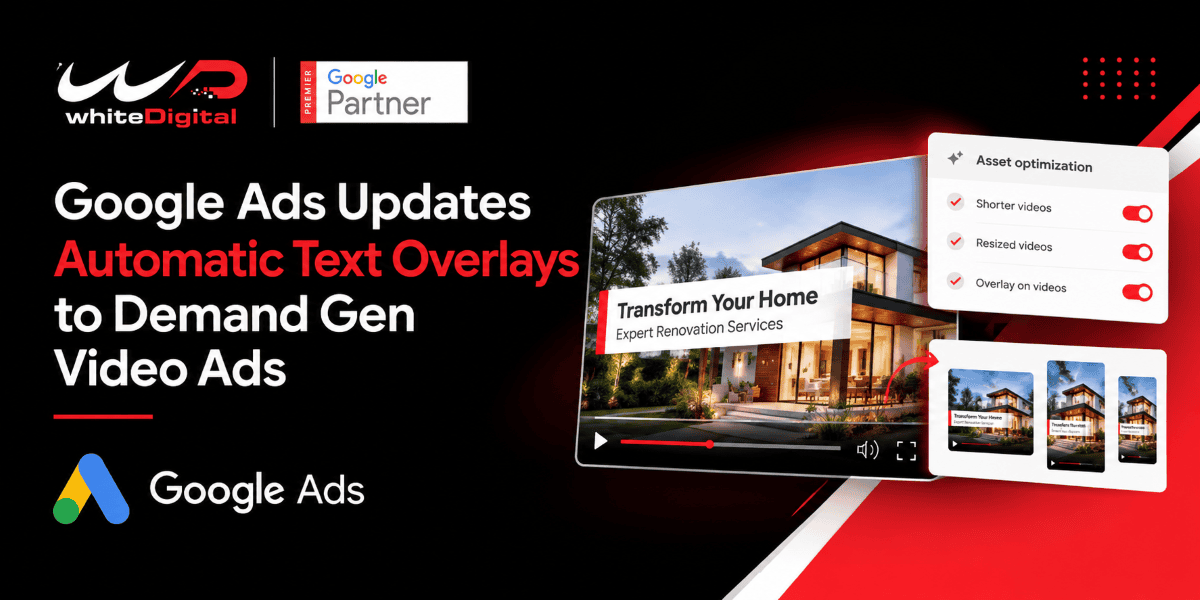
Google Ads is introducing a new “Overlay on videos” asset optimization setting for Demand Gen campaigns. The feature allows Google to add text to video ads using text assets already available in the campaign.
This gives advertisers another way to display important messages within their video creatives. However, it also means advertisers should understand how the setting works and review their ads to make sure the final creative matches their intended message.
Overlay on Videos Feature in Google Ads Demand Gen Campaigns
The “Overlay on videos” setting allows text messaging to appear over a video ad. Instead of relying only on the video footage, voiceover, or accompanying ad copy, advertisers can use the feature to bring key messages directly into the creative.
For instance, a home renovation business might use a headline such as “Transform Your Home” in its Demand Gen campaign. When text overlays are turned on, the message can appear over the video. Help viewers understand the service being promoted.
The goal is to make campaign messaging visible inside the video. Advertisers should still check that text overlays are readable and that they do not cover visual elements.
How the Feature Works in Google Ads Demand Gen Campaigns
The new setting is reported to appear in the Asset optimization section of Demand Gen video ads, alongside existing options for creating shorter videos and resizing videos for different formats.
When the overlay option is enabled, Google can use available campaign text assets to add messaging to video creatives. This may reduce the need to create and edit a separate video for every message, although advertisers should review the resulting ads before they run.
The text overlay is different from Google’s existing video enhancements, which can create vertical or square versions of horizontal videos and generate shorter versions designed to capture attention early.
Why Automatic Text Overlays Matter for Advertisers
Key messages can appear within the video
Advertisers often use headlines and descriptions to explain product benefits, offers or services. Text overlays provide another way to communicate these details while viewers watch the video.
For example, an online store can highlight a product benefit while a local business can draw attention to a service. The message should stay relevant to the video. Be easy to read.
Videos can communicate without using sound.
Some viewers watch videos with the sound turned off. A clear text overlay can help communicate the message even when viewers do not hear the soundtrack.
However, adding too much text can make a video cluttered. Short relevant messaging is more suitable than placing descriptions over the footage.
Creative production may become easier
Preparing video versions can take time especially when campaigns target different audiences or placements. Automatic overlays may help advertisers reuse existing campaign text than manually editing every version.
This does not eliminate the need for review. Advertisers should check the presentation to ensure that the text fits naturally into the video.
How Asset Optimization Works in Google Ads Demand Gen Campaigns
Asset optimization helps Google Ads to optimize assets for placement and viewing experience. In Demand Gen campaigns, Google AI can create additional versions of existing assets, including vertical and square versions of horizontal videos and shorter video versions.
Google’s documentation states that these existing video enhancements are enabled by default for new Demand Gen campaigns, although advertisers can turn them off.
The new “Overlay on videos” setting adds another type of video enhancement by placing text over video creatives using available text assets. This can help to display messages in the video itself. But it’s important to separate this setting from the current options of video resizing and shortening.
Enable the Overlay on Videos Setting in Google Ads Demand Gen Campaigns
To review the existing video enhancement controls in Google Ads:
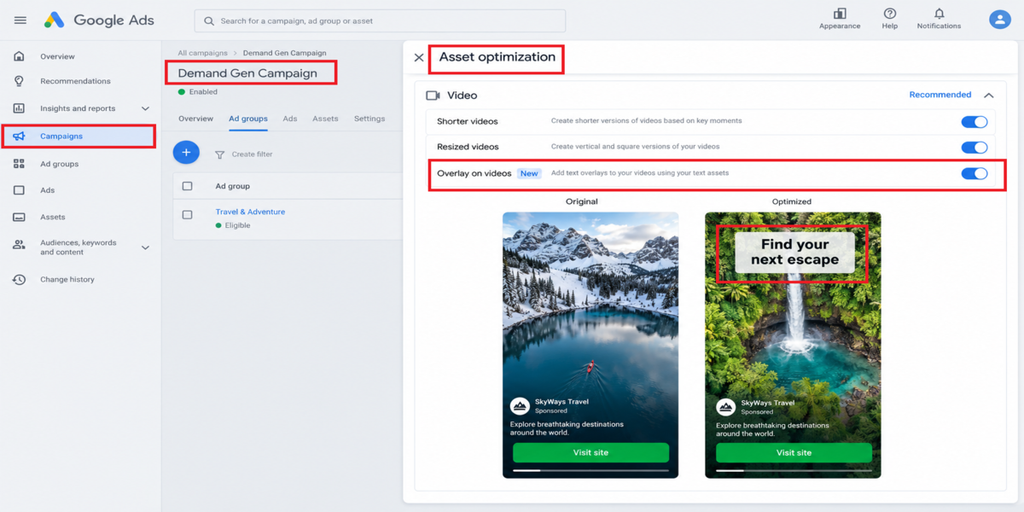
Google Ads Asset Optimisation with Text Overlay Toggle Feature
- Sign in to Google Ads and open Campaigns.
- Choose the Demand Gen campaign and ad group you want.
- Open the video ad creation or editing interface. For a new ad, select Create new ad, then choose Video ad.
- Find the Asset optimization section at the bottom of the Media card.
- Under Video, look for Overlay on videos.
- Tap the toggle next to ‘Overlay’ to turn on Overlay for videos. If you don’t want Google to add text to your videos, turn the toggle off.
- Review the ad and preview the optimized creative, if possible, before posting.
- When enabled, the feature can add key messaging from your existing text assets over the video
Is the Overlay Setting Enabled by Default?
The new “Overlay, on videos” setting has been reported as enabled by default. However, Google’s official documentation cited above confirms the default status of the existing video enhancements, not the text-overlay setting.
Advertisers should therefore check their Demand Gen campaign settings to confirm whether the overlay option is available and enabled.
Final Thoughts
The “Overlay on videos” setting adds another creative optimization option to Google Ads Demand Gen campaigns. By bringing campaign messaging directly into video ads, it may give advertisers another way to communicate product benefits and service details.
Advertisers should review the available settings, inspect the finished creatives, and monitor performance before deciding whether the feature suits their campaigns. The aim is to use automation where it can add value, but keep control of the message and overall creative quality.
Looking to get more out of your Google Ads campaigns or improve your Demand Gen performance? Reach out to our team to talk about your PPC campaign goals, creative optimization, and ad performance.