

When customers look online for a product they want to buy at a store, accurate product and location information can make a real difference. Customers want to know if the item is available locally and which store they can visit to buy it.
Google Merchant Centre has added the store_address attribute to inventory product submissions. The store_address attribute shows the address of the store linked to a product, helping merchants give clearer location information for Google’s local shopping experiences.
According to Google’s official Store address documentation, the attribute is required for each product covered by the specification.
What Is the New store_address Attribute?
The store_address attribute allows merchants to submit a store’s postal address as part of their product data. It is relevant to retailers promoting products through local inventory experiences on Google.
For example, imagine a retailer selling laptops through three stores. Customers might see the laptop in places. Giving the store address makes it clear which physical location is linked to each product listing.
Google supports store addresses in languages and lets merchants submit them through CSV, TSV or XML product feed files.
Why Does This Matter for Local Inventory Ads?
Local inventory ads allow retailers to showcase products available at nearby stores. This helps customers find items they can buy nearby.
The new store_address attribute gives merchants a field to submit the store’s postal address. Retailers who manage inventory across locations should pay particular attention to the accuracy of their product and store information.
Here are three reasons this update matters:
Store identification: Merchants can provide the physical address that belongs to a product submission helping keep location information consistent.
Product feed management: This means retailers need to look at their product lists and make sure store addresses are added and set up properly.
Local inventory data: When product and store details are correct, merchants give Google the information it needs to handle inventory submissions.
How to Add the store_address Attribute in Google Merchant Center
- Get your inventory data file in Excel or Google Sheets and add a store_address column that has the correct store address.
- Save the file in a format that Google accepts, like TSV or XML, as required by Google’s inventory data rules.
- Sign in to your Google Merchant Centre account.
- Go to Settings, then click on Data sources.
- Open the Supplemental Sources tab.
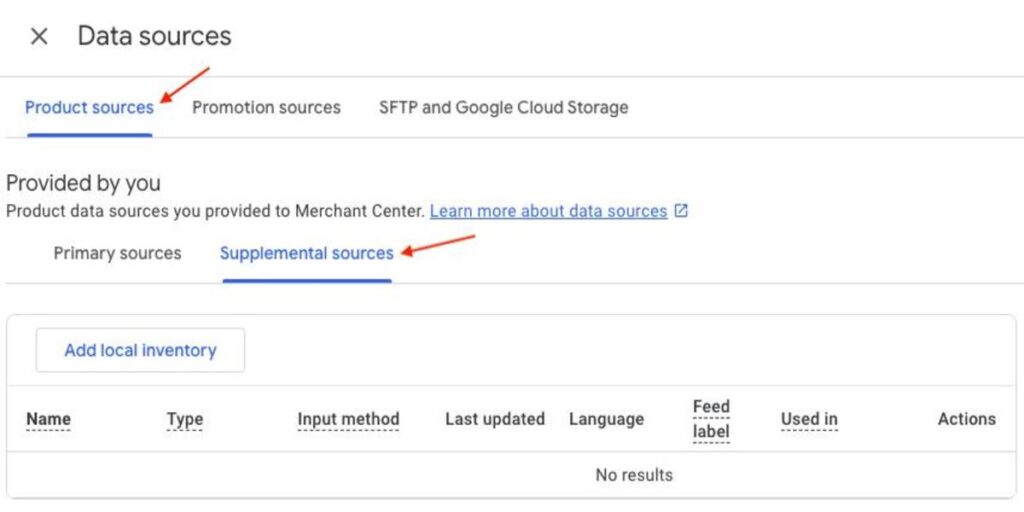
- Select Add local. Choose the option to upload local inventory from a file.
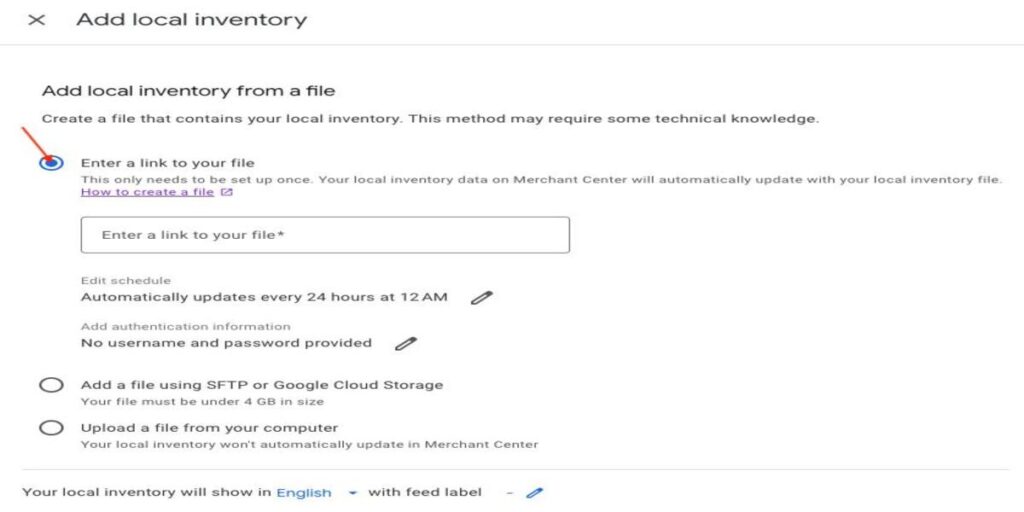
- Select Upload a file from your computer. Choose your prepared inventory file.
- Make sure your file has the required fields: product ID, store code, availability, quantity, price, and store address. Include all that apply.
- Choose the language and feed label that match your product data.
- Click Continue to complete the setup and upload the file.
- Check the status of your data source. Fix any problems like missing information, incorrect store addresses, or wrong product IDs.
- Make sure the local inventory data has been processed correctly in Google Merchant Center.
How Does This Fit into Local Inventory Management?
The store_address attribute is one part of the local inventory data process. Merchants also need to keep information such as product IDs, store codes, availability, and pricing where applicable.
Google’s Local inventory data specification explains these fields and how they help Google understand which products are available at stores.
Retailers need to ensure the data in their product feeds is what customers can buy at their stores. This is very important for businesses that have locations or products that change often. Accurate information helps prevent confusion and keeps listings trustworthy.
Final Thoughts
For retailers using Google Merchant Center to promote products that’re available, in physical stores, the store_address attribute adds another important detail to their local inventory data.
The best next step is to review your product feeds, check the address information, and make sure your submissions follow Google’s requirements. Keeping product and store details accurate can help you keep an organized local inventory setup.
Need help managing your product feeds or improving your shopping campaign setup? Contact us to discuss your Google Ads and digital advertising needs.